This story took place in October–November 2025. Browser autoplay policies are a moving target — Safari's behavior described here was accurate then, but verify against current WebKit behavior before borrowing any of these fixes.
I work as a full-stack engineer on an AI video creation platform — users generate a video with AI, then refine it in a browser-based editor with a timeline, chapters, avatars, and voice narration. A project video is made of chapters, and each chapter has its own canvas where users can layer extra objects on top — text, images, and video clips. The playback engine renders those objects and drives them all off one shared clock.
This bug wasn't about the project video as a whole — it was about those video clips placed inside a chapter.
One day a bug report came in that would eat several weeks of my life, on and off:
"Videos freeze during playback. Only in Safari."
Chrome: fine. Firefox: fine. Safari: a video object would render its first frame and just... sit there. No error dialog, no crash. Sometimes it played, sometimes it froze — and it seemed to depend on where in the video the playback started.
Step 1: Reproduce it properly
"Sometimes it freezes" is not a bug report you can fix. So the first job was turning it into something deterministic.
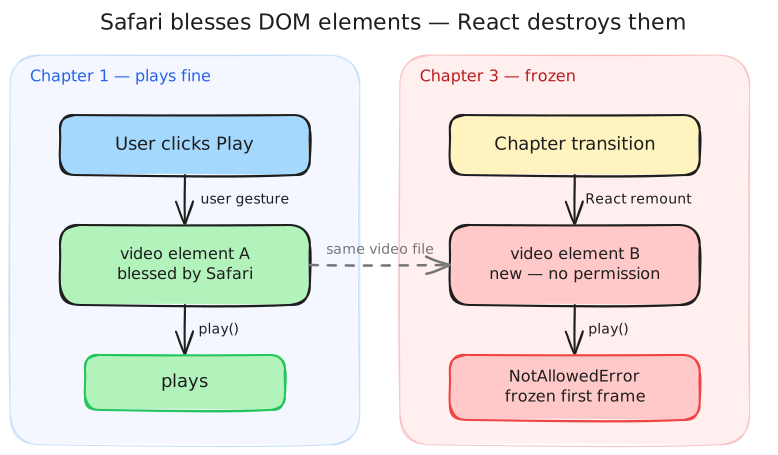
After a lot of clicking around, the pattern emerged: videos played fine in the chapter where the user had interacted with the page, and froze after chapter transitions. If you pressed play in chapter 1, a video in chapter 1 played. A video in chapter 3? Frozen first frame.
That pattern is a gift, because it points away from "video decoding bug" and toward lifecycle.
Step 2: Hypotheses
I had three:
A decoding/codec issue — Safari is notoriously picky about codecs. But the same file played fine in the first chapter, so the bytes were decodable. Rejected.
A race in our playback clock — maybe we called play() before the element had data. Plausible, but it didn't explain why only later chapters failed.
Safari's autoplay policy — Safari doesn't just require "a user gesture somewhere on the page" like Chrome mostly does. It grants playback permission to specific DOM elements that were activated by a user gesture.
Hypothesis 3 turned out to be the key, and here's the mechanism:
Our editor is a React app. At every chapter transition, React unmounts the old chapter's objects and mounts the new ones. To React this is routine reconciliation. To Safari, it means the <video> element that had permission to play no longer exists. The new element is a stranger. When our clock calls videoElement.play() on it — with no user gesture in the same call stack — Safari rejects the promise, and you get exactly what users saw: a rendered first frame that never moves.
The confirmation was satisfyingly simple: log the play() promise rejection. Chrome resolved it; Safari threw NotAllowedError — but only for elements mounted after the initial gesture.
Step 3: The fix — and the revert
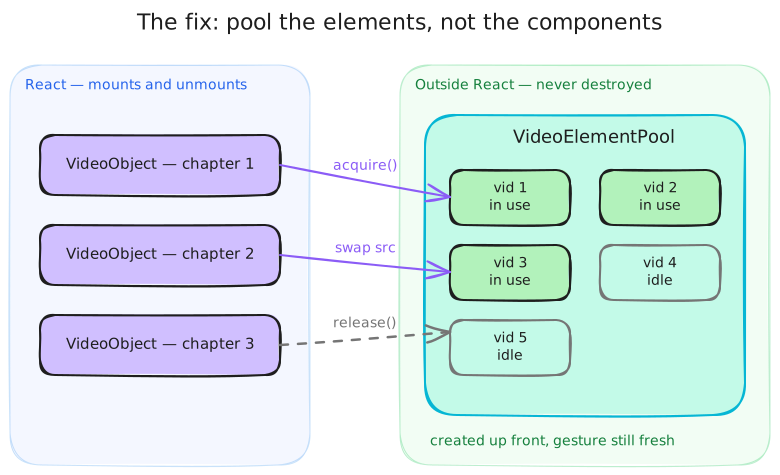
If Safari blesses elements, the answer is: stop destroying the elements.
I built a VideoElementPool — a small manager that lives outside React, pre-creates a handful of <video> elements up front (while we still have the user's gesture), and hands them out to video objects as chapters mount. Instead of React creating and destroying <video> tags, a component acquires a persistent element, swaps its src, and attaches it to its container. On unmount it releases the element back to the pool.
class VideoElementPool { private pool: PoolItem[] = [] acquire(objectId: string): HTMLVideoElement { // Reuse the element already assigned to this object, if any const existing = this.pool.find((i) => i.currentObjectId === objectId) if (existing) return existing.element // Otherwise hand out an idle, pre-blessed element const idle = this.pool.find((i) => !i.inUse) idle.inUse = true idle.currentObjectId = objectId this.reset(idle.element) return idle.element } release(objectId: string) { /* mark idle, detach, reset */ }}
I shipped it in late October 2025. It was reverted the same day.
The first version swapped element identity out from under the existing video component, but left the rest of that component's assumptions untouched — its refs, its event listeners, its interaction with the audio engine all still assumed they owned the element's lifecycle. Pooling the DOM node while the component around it believed otherwise broke playback in ways the Safari bug never did.
That revert taught me the real lesson of this bug: the fix wasn't "add a pool." It was change the ownership model. Two days later I landed the second version, which reworked the video component's whole lifecycle around the pool — acquisition on mount, imperative attachment to the container, coordination with the audio engine and the player — instead of bolting a pool onto code that assumed React-managed elements. That one stuck.
Step 4: The bug after the bug
A few weeks later, in late November, a new report: videos occasionally froze in Safari again. Rarer, but real.
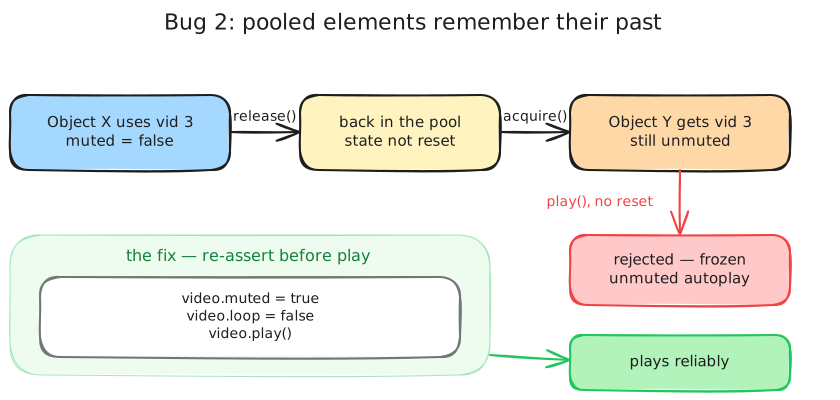
This is the hidden tax of object pooling: pooled objects carry state between lives. A recycled <video> element kept whatever muted and loop values its previous user set. And Safari has one more rule: programmatic play() on an unmuted video without a gesture gets rejected — even on a blessed element. So if an element was released while unmuted and later reused, play() silently rejected. Frozen frame, once again.
The fix was small but principled: never trust inherited state on a pooled resource — re-assert every property that gates playback, right before playing.
const video = videoRef.currentif (!video) returnif (trims?.length) { video.currentTime = trims[0].start}video.muted = true // Safari rejects unmuted programmatic play()video.loop = false // don't inherit loop state from the element's previous lifevideo.play()
(The clip's sound wasn't lost, by the way — the mute is only temporary. Once the video is actually playing, our code unmutes it again, and Safari accepts that because the pooled elements were already blessed by the user's click when the pool was warmed up. Narration is separate: it plays through its own audio engine.)
While tracing the loop state I also found an unrelated one-line bug that had been hiding in the loop toggle:
isLoop: o.isLoop ? !o.isLoop : false // 🐛 always false — the toggle could never turn ONisLoop: !o.isLoop ? true : false // ✅ actually toggles
That's the kind of thing you only catch when a hard bug forces you to read adjacent code with full suspicion.
Tradeoffs
The pool is not free:
We're fighting React. Element lifecycle is now managed imperatively outside the framework, which is exactly the kind of code that surprises the next engineer. It's documented heavily for that reason.
Pool sizing is a guess. We pre-create enough elements for a typical chapter; an LRU fallback handles the pathological case.
Stale state is a permanent hazard — the second freeze proved it. The rule "reset everything on acquire and before play" is now load-bearing.
Would I prefer a declarative fix? Absolutely. But Safari's permission model is attached to DOM identity, React's model destroys DOM identity, and no amount of wishing changes either. Sometimes the correct engineering decision is a well-contained ugly bridge between two systems that disagree.
Results
Safari video freezes at chapter transitions: gone, confirmed across the reported user scenarios.
The follow-up "stale pooled state" freeze: gone, with the reset-before-play rule guarding regressions.
One broken loop toggle: fixed as a bonus.
What I took away
"Only in Safari" usually means policy, not parsing. When one browser fails silently, read its permission model before its codec support.
Reproduce until the pattern names the subsystem. "Freezes after chapter transitions" pointed at element lifecycle long before any code did.
A revert is data. My first fix failed because I changed a low-level mechanism without changing the ownership model above it. The second fix succeeded because the revert told me exactly that.
Pooled resources lie about their state. If you recycle objects, re-assert every invariant at the boundary — the bug you prevent will be the silent kind.